Tuesday, May 17, 2011

Zoho Recruit: Now with Improved Access Permissions and Data Migration

Here's a couple of enhancements from Zoho Recruit.

Access Permissions to view Client and Client Contact details

The relationship between Recruiters and Clients is the key to run a successful Recruitment Agency. Therefore, it is vital to protect all your clients' data from unauthorized access. Zoho Recruit - Applicant Tracking System now comes with Role based and User based permissions, which allows the Recruiter Admin restrict user access to Clients' and Client Contacts' data. Grant your teammates access to this data only when required.


Data Migration

Transferring your data from one source to another takes a lot of time and effort. Recruitment data from other Applicant Tracking Systems can now be moved into your Zoho Recruit account efficiently. You can choose from below the method that suits you best, for migrating your data to Zoho Recruit:


  1. Import data from XLS, CSV and TSV formats - Using this method, you can import upto 1000 records at one shot.
  2. Import data from DOC, DOCX, PDF, RTF, TXT, HTML and ZIP formats - This method helps you automatically parse upto 200 to 300 files at a time.
  3. Migration tool - This method helps you to migrate huge data from any platform into your Zoho Recruit account, courtesy our integration with Rchilli.

Zoho Docs Gets A Fresh New Look And Feel


Y
ou probably 
must have noticed the changes in the

Zoho Docs
 UI by now.Zoho've completely redesigned Zoho's user interface with a fresh new look to improve navigation and to easily manage your's documents in the cloud. The new Zoho Docs UI has a cleaner, sleeker interface that will make it easier for you to navigate through yZoho's Folders, Workspaces etc.


Let us look in detail at what is new in this update


Easy-to-use Navigation


The new navigation system is simple and intuitive. It focuses on things that users do most often like say, going to a specific folder, workspace or group.


Drag-and-Drop Files


Uploading files to Zoho Docs just got easier. You can now upload files by just dragging and dropping them from your desktop on to the desired folders in the "Personal Folders" section. You can also drag multiple files at once. There are no plugins needed for this feature to work. This new feature uses HTML5 and so will work in browsers that support HTML5, like Firefox 3.6+ and Chrome 6+
. 


Attach From Zoho Docs


Zoho love listening to Zoho's customers and quite a number of you had told us that finding documents when using Zoho Mail's

Attach from Zoho Docs

 was not flexible enough. Zoho have now provided more options to easily find and attach the documents from Zoho Docs.


Other Enhancements


  1. If you have documents shared to you, which are not relevant to you anymore, you can use the new

    Remove Share 

    option to remove the sharing. An email notification will be sent to the author of the shared document.


  2. Using the

    Unsubscribe

    option, you now have control on what Workspaces you would want to view in your Workspace section.


  3. You can now email documents present in Workspaces using the

    Send Mail

    option.

Monday, March 14, 2011

Collaborate in Zoho CRM with IM and Group Chat

Zoho CRM just got a couple new cool features: integrated IM and group chat. This, along with our CRM+Mail integration means that if you are a serious CRM user, you need not leave the same browser tab to accomplish all you need to do.

Instant Messaging (1-on-1 Chat)
A sales rep might want to quickly check some technical information with his pre-sales/technical-sales counterpart. Or maybe he is checking for availability. Or the sales rep might want to check with his manager about approval for some special deal.

These are the kinds of situations that the instant messaging in Zoho CRM addresses. 
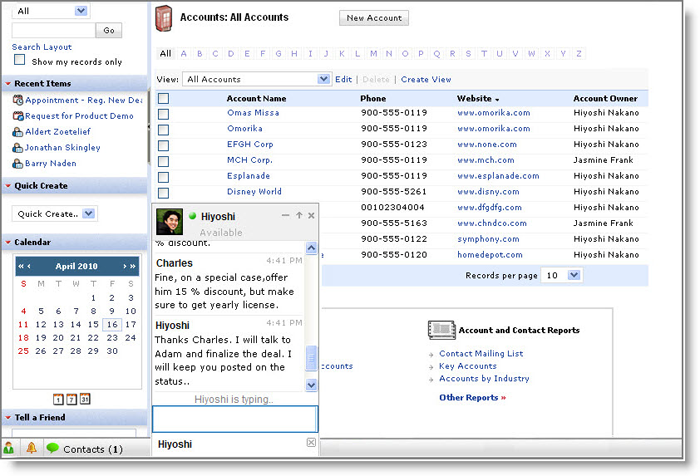
Instant Messaging in Zoho CRM works just like you'd expect, and if you already use other Zoho products, you'll be familiar with it already. You can check if any of your contacts are online and instantly chat with them from the bar at the bottom of the screen. And of course that chat window stays with you as you navigate throughout your CRM system.


Chat Topics/Group Chat
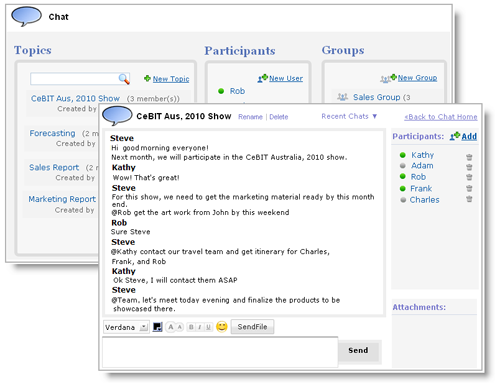
In addition to 1-on-1 instant messaging, we are also introducing Group Chat and Chat Topics for Zoho CRM. This means that you can setup different topics inside your organization - for example, a chat topic for the Western sales region. Or a topic for all the people involved in that key customer account. You can then invite multiple people to that chat topic, and they will all be able to collaborate in real-time without having to leave their CRM screen. 

One additional benefit of the group chat, is that chat users who were not online during a particular discussion can catch-up about the discussion when they log back in.


Sunday, February 27, 2011

Explore Zoho Reports

Formula Column
In addition to the base columns a table has, you can add a new column with a custom formula based on one or more of the table's other
columns. For example, say you have two columns for 'Sales' and 'Cost'.
You can define a custom formula 'Sales' - 'Cost' and add it as a formula column called 'Profit'. That's a simple example with the
difference function. There are a lot more functions listed based on type
- Date, Numeric, String, Aggregate, Statistical and General. Let's see
examples from each of these function sets.

Date: You can manipulate values of a given date column.

Example:
Let's say you have a column that has date values like 2011-01-01
12:30:48 (or say Jan 30, 2011). And you want to have a column that lists the corresponding day of the week. You can define the formula as weekday("Date").


Let's see another scenario for a date specific formula column. Say you want the number of days between a lead coming in and the sale getting closed. Or say, the number of days it takes to close a support ticket.  The formula to be used would be datediff("Date1", "Date2").


Numeric: Numeric formulas ranging from absolute value to mod to log to exponential to trigonometric functions like sin-cos-tan are all handled here.

Example
: Let's say you have some test data values in three columns and you want to list the greatest value of each row. You can define the formula as greatest("Column1","Column2","Column3")


String:
This type of formula functions deal with text values (known as 'string'in programmer lingo). Knowing the length of a given string, string concantenation (joining of two textual values), finding a substring, upper/lower case conversions etc are all dealt with here.

Example:
Here's a scenario. In one of the Date functions above, we saw weekday(date). What if you want only the first three characters of the weekday to be displayed? You can define the formula column like
left(weekday("Date"), 3)


Aggregate & Statistical : Functions like count, sum, average, variance, standard deviation, mean, median, mode etc

Example:
Suppose you want to calculate the column's average and find the difference for each row. You can have the formula as Column1 - Avg ("Column1"). Or say you want to calculate the percentage of a sale value to overall sales. The formula will be ("Sales"/Sum("Sales"))*100


General: If and ifnull functions.
Example:
There are instances where you won't like to have a null value. In such
a case you can have a formula defined something like ifnull(null, 0). All
cells with null values will get replaced by zero.
Consider another scenario. Say different product categories attract different taxes. We can calculate the tax with the formula if("Product Category"='Stationery', "Sales"*0.05, "Sales*0.08). This calculates the sales tax for Stationery as 5% and for other product categories as 8%. We can even have nested if conditions. Like if("Product Category"='Stationery', "Sales"*0.05, if("Product Category"='Furniture',"Sales"*0.10,"Sales"*0.08))


Tuesday, February 22, 2011

Cricket World Cup Tracking with Zoho

Do you follow Cricket?
If you do, you must certainly be excited about the ICC Cricket World Cup 2011 that is going on right now.

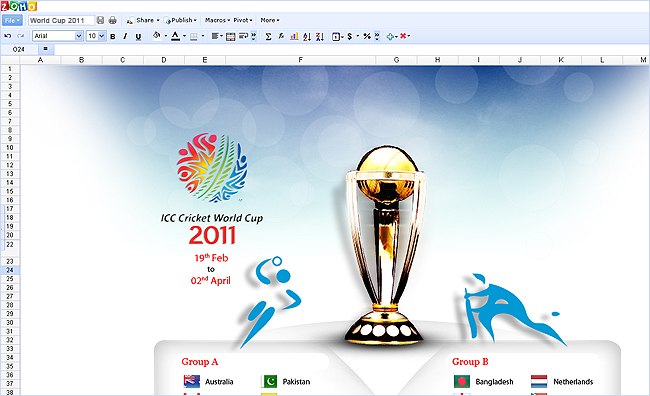
So to help you follow all the action, we've quickly tossed up a Zoho Sheet that gives you a full view of the tournament. You can see the schedule, teams, group standings, and of course, statistics.

http://sheet.zoho.com/public/zohosheet/world-cup-tracker


For a hot spot on a particular day's match and the Group Standings, you can embed the following snippets in your website/blog:


Today's Match Snippet:


<iframe src='http://sheet.zoho.com/publishrange.do?id=8d056b549340aec604ca138274ab4312' frameborder='0' style='height:102px;width:288px' scrolling='auto' marginwidth='0' marginheight='0'>&nbsp;</iframe>


Preview:


Group Standings Snippet:


<iframe src='http://sheet.zoho.com/publishrange.do?id=3ec08d610d7338e242d44f96071cef1e' frameborder='0' style='height:511px;width:432px' marginwidth='0' marginheight='0' scrolling='auto'> </iframe>


Preview:


Enjoy!

Saturday, February 19, 2011

Installing Trixbox Remote Server

have been using Trixbox for a while and I think it is time to have documented how to install it without CD using a VPS.

First, Trixbox is a set of tools that help you to maintain Asterisk.
Asterisk is opensource PBX software. It allows you to have VOIP extensions using your network connections. For my case, I have deployed 5 extensions in 5 different location in 3 countries with no long distance charge. Moreover, I can use my VOIP extension anywhere as long as I have Internet connection.

I started to use Trixbox at home using virtual machine running on Citrix Xen, however with time you realize that your phone system needs to be reliable and keeping it at home makes that task complicated (power outage, hardware problems). So I decided to move it to a data center.
Trixbox installation at home was pretty simple task since you can get de ISO image and burn a CD. But the big question was how I can install it on server running Centos 5.3 (32 bits)*

Note: I have installed Trixbox on Centos 5.3 (64bit), however Trixbox was designed to work on 32bit so you will probably have some issues with libraries since the path on Trixbox has bee set up to /usr/lib instead of /usr/lib64.

Choosing Hosting provider. My current installation is running with Godaddy , the service has been excellent and the price is ok ($30 a month for 256Mb, 20GB server) however I found a hosting provider RackUnlimited that can provide you the same for only $8 a month. At this point, I have a server with RackUnlimited and I am going to show the process of installing Trixbox.

Installation Process

1- Login on the server and make sure you have all the basic tools that you need. RackUlimited provide me with a very slim version Centos 5.3 so I had to install some packages.

# yum -y install vim-minimal sudo postfix

Also I like to install webmin ...so I grabbed the RPM form webmin.com and I installed it.

2- Install essentials packages for Trixbox.

#yum -y install mysql mysql-server mysql-devel

MySQL database

#yum -y install httpd memcached php php-pear php-mysql
# pear install DB

Apache Server and PHP packages

Now we I have server with a LAMP enviroments

3- Add the Trixbox repo

#vi /etc/yum.repos.d/trixbox.repo

[trixbox]
name=trixbox RPM Repository for CentOS and RHEL
baseurl=http://yum.trixbox.org/centos/$releasever/RPMS/
gpgcheck=0
enabled=1

#yum clean all

4- Install asterisk

#yum install asterisk
#mkdir /etc/asterisk
#cp /etc/asterisk-1.4.21.2_samples/ /etc/asterisk

5- Start all services.

#/etc/init.d/mysql start
#/etc/init.d/httpd start
#/etc/init.d/memcached start
#/etc/ini.d/asterisk start

6- Install Trixbox scripts.

#yum install tbm-pbxconfig

7- Create Databases and users.

#mysqladmin create asterisk
#mysqladmin create asteriskcdrdb
#mysql asterisk < /usr/src/tbm-pbxconfig/SQL/newinstall.sql
#mysql asteriskcdrdb < /usr/src/tbm-pbxconfig/SQL/cdr_mysql_table.sql

#mysql

mysql> GRANT ALL PRIVILEGES ON asteriskcdrdb.* TO asteriskuser@localhost IDENTIFIED BY 'amp109';
Query OK, 0 rows affected (0.02 sec)

mysql> GRANT ALL PRIVILEGES ON asterisk.* TO asteriskuser@localhost IDENTIFIED BY 'amp109';
Query OK, 0 rows affected (0.00 sec)

mysql> flush privileges;
Query OK, 0 rows affected (0.00 sec)

8- Install all Trixbox packages

#yum groupinstall Trixboxcore

9- Installing the amportal

#/usr/src/tbm-pbxconfig/install_amp

Accept the default values.

After this is done restart MySQL, Apache, memcached , and amportal.

10- Authentication for web interface

#mkdir -p /usr/local/apache/passwd/
#touch /usr/local/apache/passwd/wwwpasswd
#passwd-maint

user: maint
pass: ******

Finally you can access the Web interface.

http://serverip/

Note:
Time on Xen VMs is restricted by Dom0, so if you want to change the time in your VM you will have to do the following.

#echo 1 > /proc/sys/xen/independent_wallclock

to leave it perm do the following

#vi /etc/sysctl.conf
add
xen.independent_wallclock = 1

Change the timezone

#cp /usr/share/zoneinfo/America/New_York /etc/localtime

However you can install yo modify the time zone

#yum -y install system-config-date
#system-config-date

Adding G729 Codec .....

G729 is a voice compression protocol designed by Digium.G729 is capable of using very little bandwidth with good voice quality (8K). You can buy a license for this codec from Digium or use a free version (free version is not considered very stable).

This guy made a pretty good job showing how to use G729.
http://nigglingaspirations.blogspot.com/2009/10/installing-free-g729-codec-on-trixbox.html

Friday, February 18, 2011

Installing FREE PBX in Centos

http://www.freepbx.org/support/documentation/installation/install-process-for-centos-5-1

Wednesday, February 16, 2011

What is The Cloud and What Does it Mean for My Business?

The Cloud

A specific definition for “the cloud” is the cause of much controversy on blogs, in popular tech publications and even within my own office. The prevalent definition is based on the fact that clouds are constantly changing, much like the Internet itself. Whatever your definition may be, “the cloud” certainly encompasses many different technologies. A few of these include cloud computing and cloud web hosting.

Cloud Computing

Cloud Computing DiagramWhat is it? Cloud computing can be many things, but it is most accurately described as a network of computers with a centralized load balancer that constantly analyzes where resources (CPU and RAM) are available. The load balancer then distributes those resources to fulfill the needs of whatever program or calculation that is being executed. This ensures that the resources of each individual computer are fully utilized. Cloud computing also prevents total system failure if a component of the system fails. A great example of this is the Stanford Protein Folding Project.

What does it do? Cloud computing was invented so that a complex computer system could be be self healing and self optimizing to maximize equipment usage. Applications running on the cloud computing model do not require additional programming to function across multiple machines because the “cloud” acts as one machine.

Is it useful? Cloud computing is popular for research projects and large scale software or application development as they can be incredibly resource intensive. By using the cloud computing model for development and research projects, it is ensured that resources are available and distributed as needed. Cloud computing really is brilliant for its intended use.

Cloud Hosting

Cloud Hosting DiagramWhat is it? Cloud hosting was developed years ago and in certain ways mimics cloud computing. It is a type of web hosting that has a load balancer to determine how much CPU and other resources each customer will need. It then allocates these resources on an on-demand basis from the web hosting provider’s server farm. Users then only pay for what they use.

What does it do? Cloud hosting can host websites, but is really built to be a scalable virtual environment for resource intensive application development.

Is it useful? Cloud hosting is very useful if you are developing an API (application programming interface) or anything that requires large amounts of CPU or other resources. Examples of this include:

• If you need to upload thousands of images, resize them, and deploy them on a web site similar to iStock Photo.

• If you have a project that requires thousands of calculations without a time constraint.

What Does This All Mean For My Business?

Most businesses will not need to be part of a cloud computing network as they just don’t require the resources that the network provides. However if your business does rely on resource intensive application development, a cloud hosting platform may be an excellent option for you. If cost is a concern, keep in mind that the more resources you use the more you will pay. Also, remember that many cloud web hosting solutions do not include “stateful storage,” meaning you cannot store applications on your server space. Instead you may upload and run them, but once that is completed the cloud will wipe it clean in order to provide resources for other users who may need them.

For a typical small or medium business website, stateful storage is necessary. Some cloud hosting will have storage, but it is important to know where, geographically, your web site is going to be. In some cases, the “cloud” might actually be on the other side of the world! This will lead to slow uploads and downloads. This is obviously not something you want to deal with for your website. Look for storage/hosting geographically close to you.

Monday, February 14, 2011

What are the different types of cloud computing?

What are the different types of cloud computing?

Web-based email services from Google and Yahoo, backup services from Carbonite or MozyHome, CRM and Project Management like ZOHO.com, instant messaging and voice-over-IP services from AOL, Google, Skype, Vonage and others are all cloud-computing services, hidden behind yet another layer of abstraction to make them seem even simpler to end users who want the kind of power sophisticated computing can give them, but don't want to know how it's done.
There are three basic types of cloud computing:
• Infrastructure as a Service — provides grids or clusters or virtualized servers, networks, storage and systems software designed to augment or replace the functions of an entire data center. The highest-profile example is Amazon's Elastic Compute Cloud [EC2] and Simple Storage Service, but IBM and other traditional IT vendors are also offering services, as is telecom-and-more provider Verizon Business.
• Platform as a Service — Provides virtualized servers on which users can run existing applications or develop new ones without having to worry about maintaining the operating systems, server hardware, load balancing or computing capacity. Highest-profile examples include Microsoft's Azure and Salesforce's Force.com.
• Software as a Service — The most widely known and widely used form of cloud computing, SaaS provides all the functions of a sophisticated traditional application, but through a Web browser, not a locally-installed application. SaaS eliminates worries about app servers, storage, application development and related, common concerns of IT. Highest-profile examples are Salesforce.com, Google's Gmail and Apps, instant messaging from AOL, Yahoo and Google, and VoIP from Vonage and Skype.
You also get a nice and very popular Software as a Service on CRM , Project Management, Support , HR(people) from ZOHO.com. For more help OscilloSoft.com.au.
source: http://www.cio.com/article/501814/Cloud_Computing_Definitions_and_Solutions.

Thursday, January 27, 2011

New in Zoho CRM: Minor UI Improvements


2010 has been a year of integrations for Zoho CRM. It has been a successful year with lots of internal and external integrations. Before Zoho bid fareZoholl to 2010 , Zoho are rolling out a few more UI improvements in Zoho CRM.

Here they are:

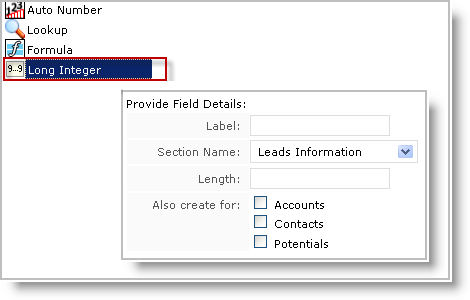
Earlier, Zoho Zohore supporting 17 types of czohotom fields, like Text, Decimal, Formula, Lookup, Pick List, etc. Now, Zoho have added the Long Integer type czohotom field that can support up to 18 digits. This field will help you to record numbers that exceed 9 digits. For example, Bank Account numbers​ , Support Ticket numbers etc.​


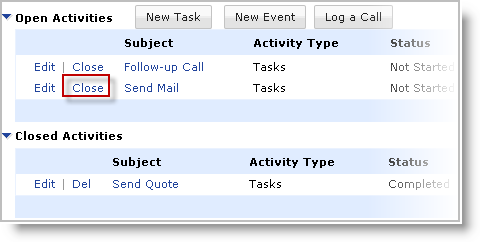
We have also added a one-click option to close the tasks from the List Views. This option will save you a few clicks while closing tasks.


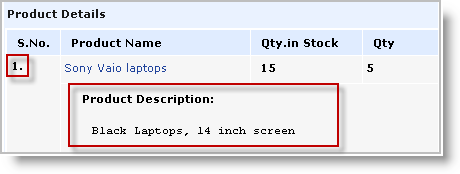
Another addition is the product description field for the line items. This will help you include a small description of the products associated to Quotes, Invoices, Sales Orders and Purchase Orders.


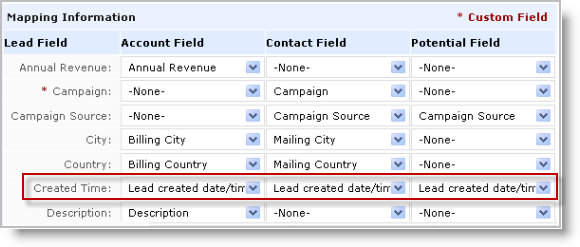
The next new feature lets you transfer ' Lead Created Time ' details in Accounts, Contacts and Potentials upon lead conversion. This will help you keep track of the time the lead was generated and the time taken to close the deal .​


Lastly, there is now an option that lets you choose the Section while creating a field. This too, will save you time as you won't need to visit the Edit Page Layout feature to add the new custom field in the appropriate section.


Thursday, October 7, 2010

What is Cloud Computing


The cloud computing revolution is real: it’s on the front page of theAustralian Financial Review this morning. But is it really “a radical new business model that purports to slash technology costs by up to 80%”?
What is cloud computing?
Every business bigger than one person needs somewhere to store its data and run its business applications and communications, including email. A generation of businesses has installed a server — or many servers in a data centre — and hired specialist IT staff to run it.
With cloud computing, you instead rent capacity in a provider’s data centre, and connect over the internet. The provider’s staff install, maintain and upgrade hardware and software as required. Typically you’ll rent a service, such as data storage or email or accounting, rather than ‘a server’ as such, and pay $X per user or $Y per business per month.
Why is it called cloud computing?
Network diagrams have traditionally used a cloud symbol to denote ‘the internet’ or, before that, the telephone network outside the customer’s zone of responsibility.
What services are on offer?
You name it. Google’s Gmail and Microsoft’s Windows Hotmail are email in the cloud. In the lucrative business productivity market, Google Docs and Google Apps compete directly with Microsoft Office and Exchange — the latter now ‘in the cloud’ as Microsoft Online Services.
Accounting, customer relationship management (CRM), project management, email marketing, spam and virus filtering, data storage, ecommerce, online publishing, audio and video streaming, general databases — all available in the cloud.
Why use cloud computing?
Potentially cloud services are cheaper and more flexible. Because they’re internet-based, you can access them from anywhere — often including mobile devices.
Most servers and internet links lie idle most of the time. Cloud providers host many businesses on a pool of hardware, sharing the cost of servers, electricity, data links, backup systems, IT staff and even real estate. A cloud provider can quickly add extra capacity or scale it back again when you need it. Capital expenditure on servers and up-front software licenses, and the unpredictable costs of dealing with emergencies, are replaced by a predictable operational cost.
Can it really cut IT costs by 80%?
That’s hype. Hardware and internet costs are dropping, sure, but supporting end users is still a significant cost. Moving to the cloud removes the cost of maintaining your own systems, but you still need to configure the generic cloud-based service to match your business’ unique needs, train your staff and help them find lost spreadsheets.
Is there a downside?
You become dependent on your cloud providers. If there’s no easy way to extract your data in a usable format, your business success is now intertwined with theirs. There may also be legal and privacy issues: will your data become subject to the privacy and data retention laws of another country; will you still be compliant with your industry requirements in Australia?
Is it secure?
Big cloud providers like Microsoft and Google have some of the best security staff on the planet. Their backup procedures are likely to be better than yours too. (Where are your business data backups right now?) However big cloud providers do represent an attractive target to hackers — if they can break in.
Is cloud computing “radically new”?
Not everyone thinks it’s that big a change. It’s more evolution than revolution. “Cloud computing is not only the future of computing, it is the present, and the entire past of computing is all cloud,” saidLarry Ellison, founder of Oracle Corporation and the world’s sixth richest man, in a passionately entertaining rant last year. “It’s not water vapour. All it is is a computer attached to a network. What are you talking about? I mean, what do you think Google runs on?” As Ellison points out, CRM provider Salesforce.com has been running more than a decade.
In many ways cloud computing is indeed just the current buzzword for what has also been called utility computing, grid computing, software as a service (SaaS), IBM’s ‘On Demand’ branded services, the application service provider (ASP) model, or even good ol’ mainframe timesharing.
Where is Australia in all this?
Some big companies have committed to cloud computing, including the Commonwealth Bank, Westpac, Visy and Komatsu. The Royal Australian College of General Practice will provide GPs with cloud-based e-health applications by this time next year. Even the Department of Defence’s CIO is advocating the cloud.
On the supply side, Telstra is investing heavily to become a player — they’re providing the RACGP’s services. Saasu and Campaign Monitor are Australian success stories in cloud-based accounting and email marketing respectively.
Cloud computing does require solid internet links, however. Australia’s relatively expensive broadband infrastructure may have held back adoption. The NBN will presumably fix this.

Tuesday, October 5, 2010

Zoho Projects Now Integrated With Google Apps

Web-based productivity suite Zoho has continued to integrate its products with Google in order to make it easier to use Gmail and Zoho apps simultaneously. Last summer, Zoho, a web-based software suite that includes document, project and invoicing management tools, integrated Google and Yahoo sign-ins, allowing users to sign into Zoho using a Google or Yahoo account. And over the summer, Zoho is launched sign-in integration with Google Apps, letting users login to Zoho using their Google Apps credentials. Today, Zoho’s project collaboration product, Zoho Projects, will become an extended application to Google Apps.
Zoho Projects is a team collaboration and project management application that allows teams to plan, track and collaborate on everyday activities and big projects with external customers. With the new integration, Google Apps users can login to Zoho Projects using their Google Apps sign-in info. Users can then upload their documents from Google Docs to Zoho Projects directly. Any tasks, meetings or activities in Zoho Project will automatically bee updated in Google Calendar. And Zoho Projects gadgets can be embedded within Gmail, iGoogle and any other OpenSocial compatible sites.
The integration comes on the heels of the initial roll out of Google’s own all-in-one, futuristic collaboration tool, Google Wave. But despite facing competition from the big guns like Microsoft and Google, Zoho continues to remain as a player in the document management space thanks to continuous innovations and iterations to its products. It’s almost reminiscent of Salesforce.com’s strategy.
In fact, because of this highly competitive landscape, integrations are vital to the software’s success as an application suite. Recently, Zoho launched integration with Microsoft Sharepoint as well as with Microsoft Access. Zoho’s project management application, Zoho Projects 2.0, also added the capability to import existing projects from MS Project, Microsoft’s project management desktop software. And Zoho also launched a forum tool, called Zoho Discussions. It looks like the startup’s strategy is paying off—Zoho has been able to accumulate 2 million users in just 4 years.

e

SaaS battlegrounds: Salesforce v Zoho


When Salesforce.com CEO Marc Benioff put on his jocular performance for the analysts and press at Dreamforce yesterday, I’m sure he didn’t expect little ol’ Zoho to come bite him in the pants. That’s exactly what’s happened.
Salesforce.com’s strategy can be boiled down to one word, according to chief executive Marc Benioff — love. Of course, Benioff was being a little tongue-in-cheek…
As with its other offerings, Microsoft’s new cloud-computing application platform, Windows Azure, is all about tying people into Microsoft products and services, Benioff said. Salesforce, on the other hand, is much more about being open and cooperative, both in its customer relationship management (CRM) services, and inForce.com, its platform for business applications. Salesforce is interested in connecting multiple clouds, platforms and devices — witness today’s announcement that Force.com will integrate with the Facebook platform and Amazon Web Services, or Salesforce’s integration of Google Apps earlier this year.
Comparing Microsoft and Salesforce, Benioff said: “They hate everybody and we love everybody, and that’s pretty much the difference. We even love Microsoft. … This is our core strategy, love.”
Rough translation: we’re good guys (ergo trust me) and Microsoft are bad guys (ergo don’t trust them. Sounds sweet until you understand the game of hardball Benioff plays when faced with anything he sees as a competitive threat. Benioff’s message certainly raised hackles with Sridhar Vembu, Zoho’s CEO. In a blog post today, Vembu recounts how Benioff tried to strong arm Zoho into giving up on its CRM development:
Benioff told me he could not permit us to play on the AppExchange as things stood, but he would be happy to acquire us. We had several rounds of meetings on this,  finally I told him I really don’t see any cultural compatibility between the companies. He changed tack and repeatedly tried to get us to discontinue Zoho CRM, in return we would get to play on AppExchange. I was furious because both Benioff and his team clearly knew we had a CRM offering going into this engagement, and if they had this as a pre-condition for us to integrate into AppExchange, we would never have put in the resources we did.
Since then, Salesforce has repeatedly tried to block customers from migrating to Zoho CRM, by telling them (falsely) that they cannot take their data out of Salesforce until their contract duration is over. We have emails from customers recounting this.
This is not a new story but one I have heard Vembu recall on a number of occasions. Vembu then goes on to assert that while Google represents a potentially much bigger competitive threat, Zoho has experienced no difficulty in getting engineering assistance from Google. What’s going on here?
Readers need to understand that Benioff comes from Oracle, a company famed for playing hardball as epitomized by its CEO, Larry Ellison. Oracle has a knack of turning out hard nosed, often successful Silicon Valley execs that are super competitive. Benioff is another in a long line of execs that include Tom Siebel (Siebel Systems), Craig Conway (PeopleSoft) and Zach Nelson (NetSuite.)
These companies understand one thing - winning is all about lock in and with the Force.com, Salesforce.com is no different any of its predecessors. Benioff as near admitted as much when he said to Ha that:
When an audience member pressed Benioff on his touted openness, Benioff emphasized that he’s talking about cooperation with other companies, not open source, per se. He also acknowledged that Force.com has its closed aspects, namely the fact that if you build an application on Force.com, you can connect it to other platforms, but you can’t fully move it to another cloud.
Ergo once you’re on Salesforce.com’s cloud for business critical applications, you are in no different a position than if your code was tied to SAP’s ABAP. You can’t move without significant retooling. This runs contrary to many people’s expectations about what ‘cloud computing’ is all about; openness, flexibility and the ability to on and off-ramp as requirements demand. That may not apply so easily for transaction based systems and that is what Salesforce.com is counting upon.
Is Zoho alone? Is it a case of the yappy dog going after the farmyard pitbull because it isn’t getting its share of scraps? Hardly. If GE successfully completes its evaluation of Zoho Office, then Zoho will have scored one of the biggest, if not THE biggest saas applications deals to date. Something that must stick in Benioff’s throat but which ironically will have been won from Google.
On the Silicon Valley grapevine, I have heard of other cases where Benioff has tried to strong arm technology vendors, only to be sent away with his tail between his legs. Of course in the Valley, there is always an element of hubris, but every now and again, these stories bubble up.
As Salesforce.com gets bigger and it attracts more developers to its Force.com platform, we can expect more yapping and reminders about however much Benioff may declare his love, he is really acting like every other enterprise vendor that has gone before: locking you in while smiling benignly. In the long term, that also means higher cost as the captor squeezes as much out of its prisoners as possible.

Monday, October 4, 2010

Zoho steps up its contextual search game


Zoho on Tuesday rolled out a search feature for its business apps that allow users to aggregate data across a company.
The so-called “actionable search” consolidates a bevy of search boxes specific to each Zoho application—Zoho Mail, Docs, Writer, Sheet etc. Zoho said in a blog post that its results are designed to show the interworking of the business apps and gives you context on relationships between the data on a single page.
As for the actionable part, Zoho said that each result allows a user to open an application from within search results. For instance, an email app doesn’t have to launch to reply to a missive in a search result.
Zoho’s new search is another incremental feature designed to better compete with rivals ranging from Google to Microsoft. Zoho CEO Sridhar Vembu said in a recent interview that the company was staking its claimon contextual relevance between its various applications.
The Zoho universal search box will be integrated into all Zoho Apps.

Tuesday, September 14, 2010

Latest Enhancements in Zoho Recruit Applicant Tracking System

Zoho Recruit - Applicant Tracking System - continues to provide its users with significant enhancements since its launch. These enhancements have come about as a result of listening to our users' - that is you, dear readers - recommendations. And we attribute Zoho Recruit's big success to our users' suggestions. Following are the some of the latest user requested improvements in Zoho Recruit.

Multi-Select Pick List Field in Customization
Multi-Select Pick List has long been one of our most requested features. Zoho Recruit now provides the multi-select pick list field, which enables selecting multiple values while creating and editing records. For instance, your organization may be offering an opportunity for candidates with different skill sets, and some of your candidates may have multiple skills. In this case you can use the multi-select pick list (instead of the single pick list option) and this helps the candidates to choose multiple skills in which they are qualified.

Spanish, Korean and Portuguese Languages Support
Zoho Recruit - Applicant Tracking System is accessed around the world and many of our users speak languages other than English. Spanish, Korean and Portuguese are the latest languages to be support by Zoho Recruit's UI.

Rich Text Editor for Composing Email Messages
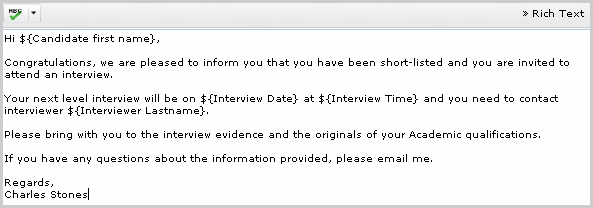
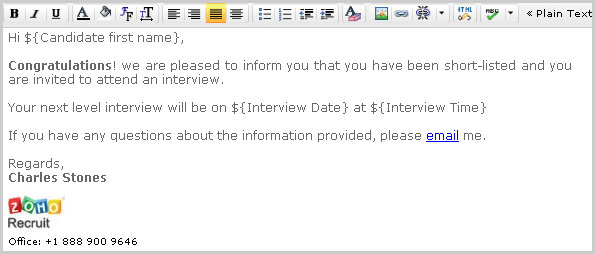
With mail inside Zoho Recruit, you can not only send plain text emails or messages containing attachments but can now send Rich Text formatted emails with the ability to change the colors, font, font size, text alignments, insert images and links, etc.

Earlier my email messages were simple.

Now my email messages in Zoho Recruit are a lot more stylish.

File Formats Supported by Zoho

A Zoho user wanted to know this info recently - all the file formats supported by Zoho Writer, Sheet & Show. We came up with a Zoho Sheet containing the relevant info, which is embedded below. Hope this will be of help to all Zoho users.

Monday, September 13, 2010

Zoho Wiki scores heavily by being the de facto team collaboration tool within Zoho. Various groups like usability engineers, developers, QA across different teams in Zoho have implemented Zoho Wiki for sharing the design docs, reviewing the feature sets, storing the release plans and even documenting best coding practices. Technical writers use Zoho Wiki for writing our help manuals. Marketing team tracks the marketing efforts in a Wiki. Our resellers and partners across the globe, collaborate with us via wiki. In fact, Zoho's intranet runs on Zoho Wiki.

It is quite surprising to note how varied the implementations are. All this is possible, mainly because

  • Zoho Wiki is flexible enough to mold itself and cater to the diverse needs within an organization.
  • Each team gets its own space within the company with separate admin controls. Team Workspaces within the organization wiki allows collaboration with internal groups as well as third parties like resellers and partners.
  • Enterprise level security - You can set different permissions for different groups of users.
  • Easy implementation - it takes just a few minutes to set up a wiki and start working.
  • Very Intuitive - Right from HR to Finance to Sales, all employees can easily adapt to this business wiki.

We have launched a new Product Video that will help you see if Zoho Wiki can be the answer to your company's quest for an Affordable Enterprise Wiki. Have a look and let us know your thoughts. Also, keep us posted on how you use Zoho Wiki within your organization.


New in Zoho CRM: Mail merge in the cloud with Zoho Writer integration

We've said before that going forward, you should expect a lot more integration across all of our products. We are working hard on doing just that, so Zoho products become more useful for our users. Today we are ready with another one of these integrations: Zoho CRM integrated with Zoho Writer.
A CRM product and an online word processor? Yes. See... until now, if you wanted to do a traditional mail-merge (the kind that goes in the mail), you were only able to do it with a desktop application such as Microsoft Word or Open Office. But with Zoho CRM and Zoho Writer now you can do that entirely on the web. Last year we introduced the Zoho CRM Plug-in for Microsoft Office, and since then many customers asked us via e-mail and our forums: why can't I do that with Zoho Writer? Well, now you can!

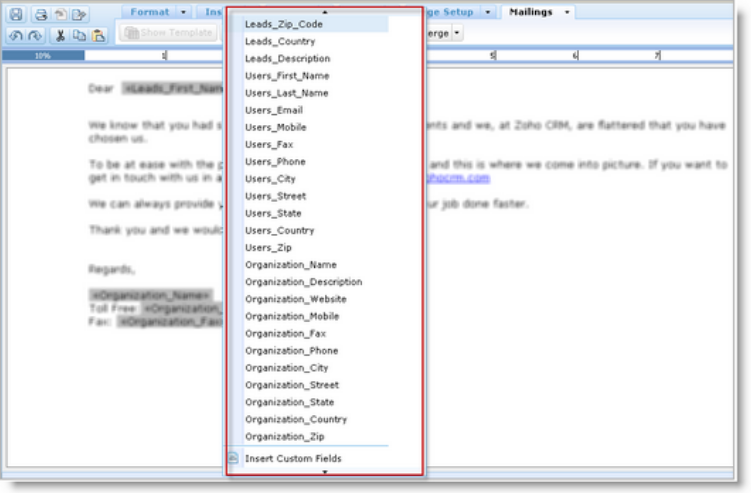
Mail merge requires you to have access to the "data" fields (those fields that you want to replace with unique values from your CRM database on the final output). You of course also have access to this list of fields from within the Zoho Writer interface when you are creating a mail merge template:


(Before you run to try this within Zoho Writer - no... you won't find it there, you need to access this from within Zoho CRM.)

The Zoho Writer Add-on for Zoho CRM is is available today for all of our Professional and Enterprise edition customers. Find more information about how to do your crm mail-merge entirely easily and with no install or configuration required.

With Vision and Solution